
If the thought of building a website has ever made you want to close your laptop and walk away, we get it. The blank page is intimidating, the decisions are endless, and before you know it, you’ve spent three hours looking at color palettes and accomplished nothing. That’s exactly why we’re so excited to introduce SiteJet, now available through staXscale. It’s a smart, AI-assisted website builder that helps you go from zero to something-you-can-actually-work-with in a matter of minutes (and it sure as heck has a lower learning curve than WordPress and Elementor).
Whether you’re starting fresh or just trying to get a feel for a new direction, SiteJet is a genuinely fun tool to play with. Here’s how to get up and running.
Before you begin, one important note
SiteJet works best when you set it up right when you first sign up for staXscale. Because it’s a standalone builder, it can’t run alongside another builder like WordPress, so the timing matters. If you already have a WordPress install but haven’t built anything out yet, don’t worry, you can still make the switch. Just keep reading.
Step-by-step: Setting up your SiteJet
1. Log in to your staXscale Client Area
Head over to https://my.staxscale.com/clientarea.php and log in to your account.

2. Access your dashboard
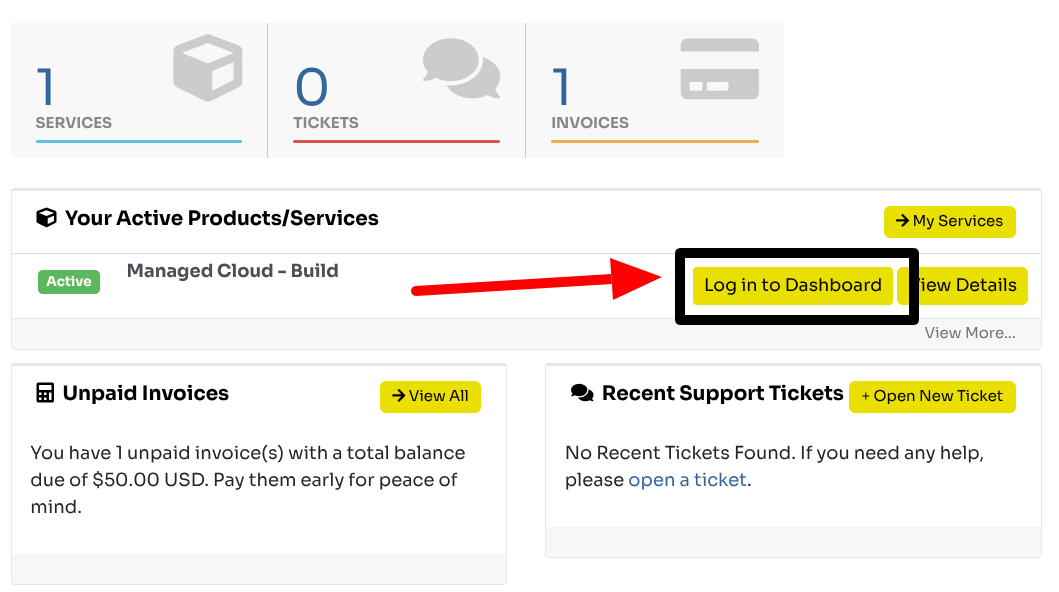
Once you’re in, click the “Log in to Dashboard” button. This takes you into the main area where your hosting and website tools live.
3. Navigate to “Websites & Domains”
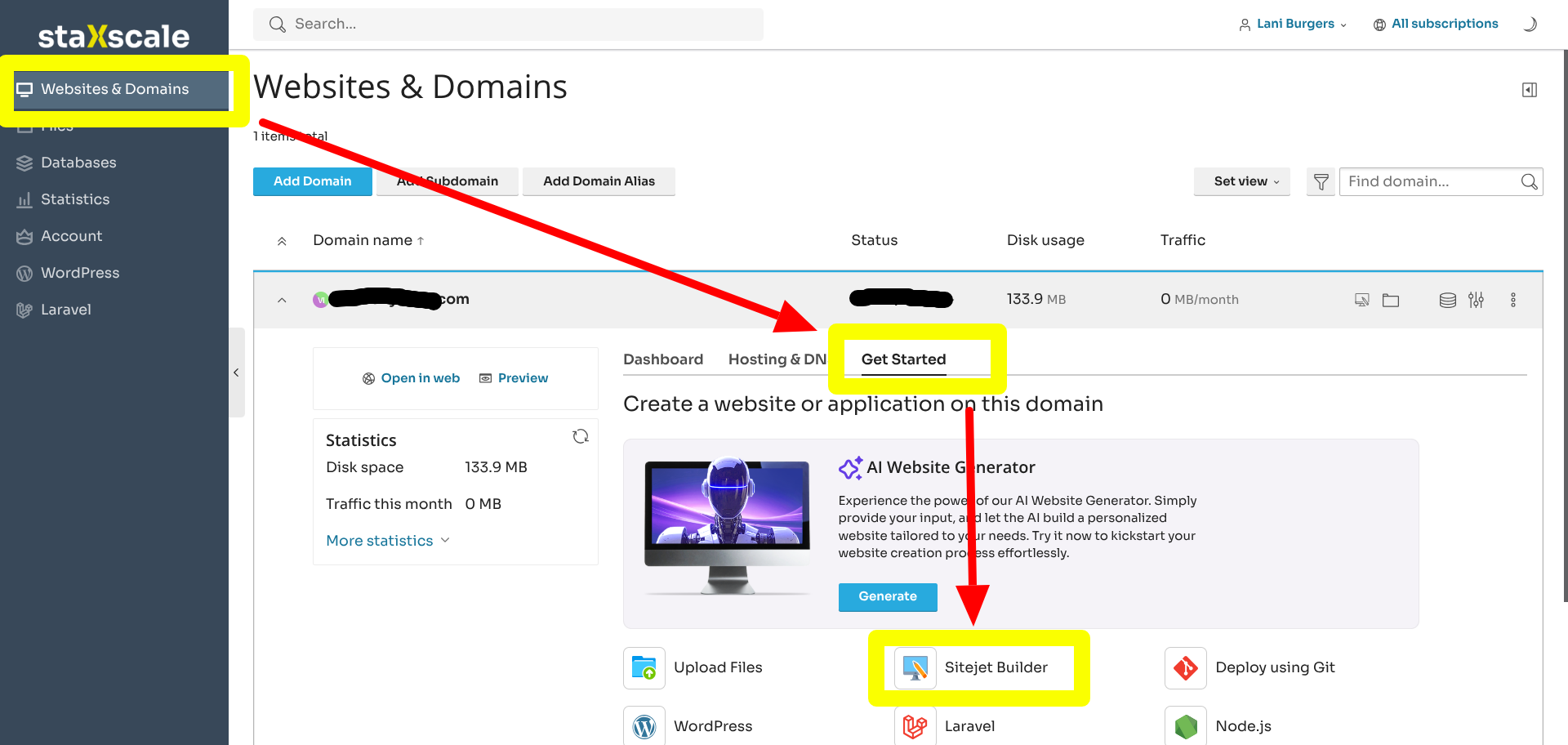
You’ll land on the Websites & Domains page. From here, click “Get Started” to begin the setup process.
Already have WordPress installed?
If you set up a WordPress install but haven’t built anything yet — nothing to lose! You can still use SiteJet. Just click into “WordPress,” select the URL from the list, and click “Detach” at the top to remove it and start fresh.
A word of caution: Do not detach a WordPress site you’ve already put work into. Instead, use one of your unused URLs or pick up an inexpensive domain to use for testing or exploration.
4. Select “SiteJet Builder”
Once you’re clear of any conflicting installs, click “SiteJet Builder” to launch it.
What happens next (the fun part)
Here’s where things get exciting. No really. SiteJet goes to work almost immediately – in fact, the initial generation took us just 24 seconds when we last tested it. In no time, you’ll have a starting point that’s actually yours to react to.
From there, you can regenerate any section — or the whole site — if the first draft isn’t quite right.
- Try on color options to find a palette that feels like you
- Experiment with font combinations to get the typography feeling right
- Choose from a wide selection of pages; and when you select them, they fill in automatically with AI-generated, brand-relevant copy
Then, it drops you right into the editor to start making it your own.
PS: Coming back later… Life happens, and you might not finish everything in one sitting. SiteJet saves your progress, so just head back to the “Websites & Domains” section, click “SiteJet Builder,” and it’ll take you straight back into the editor exactly where you left off.
Here are the results of our test
Don’t laugh at the company name or AI-generated text, this was just a silly test:







Our honest take
We had a genuinely great time playing with this, and we think you will too. Is it a substitute for a talented web designer? Hell no. But what it is really good at is giving you solid bones to build from.
One thing that stood out to us: SiteJet is a dream for anyone who experiences decision fatigue. At every step, it gives you three options to react to before ever asking you to dig deeper. You’re never staring at a blank screen wondering where to start.
We also love the idea of using SiteJet to create a mockup for your web developer. Instead of trying to describe in words what you’re envisioning (the back-and-forth on that alone can take weeks), you could hand them something visual that communicates the direction (not necessarily the final design) you’re hoping for. That kind of clarity can save everyone a lot of time.
You’ve got this!
Getting a website off the ground doesn’t have to be a months-long ordeal. With SiteJet, you can go from a blank slate to a real, working draft in the time it takes to brew a cup of coffee. We hope this tool takes some of the pressure off and gives you a little creative momentum – you deserve it!
Ready to try it? Log in and give SiteJet a spin. We think you’re going to love it.